Dremio maintains physically optimized representations of source data known as Data Reflections. It can be thought of as a hybrid between materialized views and indexes. This way, Dremio’s query optimizer can accelerate a query by utilizing one or more reflections to partially or entirely satisfy a query, rather than processing the raw data in the underlying data source. Dremio takes advantage of open data lake table formats and stores reflections as Apache Iceberg tables.
Large reflections should be designed to maximize partition and split pruning when used to accelerate queries. The basic idea is that if your reflection contains 1B rows, the reflection data files should be partitioned and sorted so that queries can scan as few physical files as possible. This can only happen if the reflection splits are designed to match query access patterns. For example, if your reflection contains a year’s worth of event data and a reflection is partitioned by date, then running reports on the last 7 days of event data will only need to access the splits (or files) from 7 partitions.
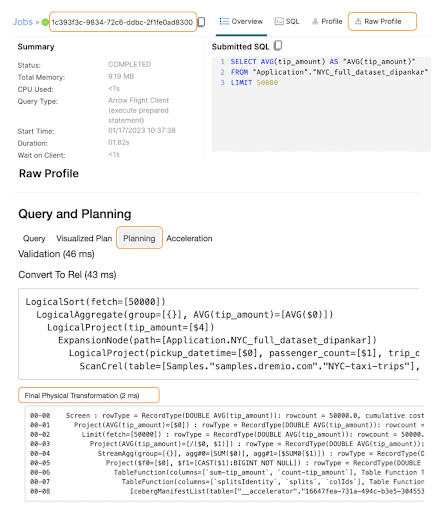
When running a query that is accelerated by a reflection, the way the reflection fields are partitioned and sorted and the SQL filters on these fields will directly impact how partitions and splits are pruned and scanned. In Dremio UI, pruning can be seen in the leaf operators of the final physical plan which can be found in the Final Physical Transformation Phase. To access it, you can go to the ‘Jobs’ section, then click on the specific job you ran (based on the query) and then Raw Profile -> Planning as shown in the screenshot below.
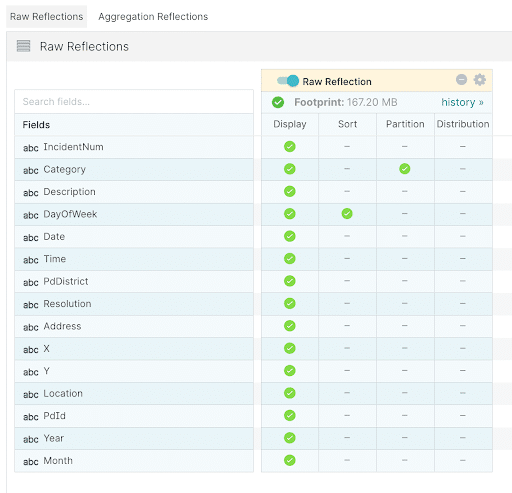
In the following examples, we use the SF Incidents datasets (2.2M records) with a raw reflection partitioned on the Category field and sorted by DayOfWeek. There are 39 distinct values for Category and therefore we will have 39 partitions.The reflection is defined as shown in the image below.
After the reflection is built, we can check how many splits (across partitions) were created on the physical disk.
find . -name "*.parquet" | wc -l
     115
Note : For this demonstration, we set the support key store.parquet.block-size to 1MB to artificially generate a lot of splits. We also set the distributed store to be local PDFS for ease of demonstration and understanding, though this is not recommended for production.
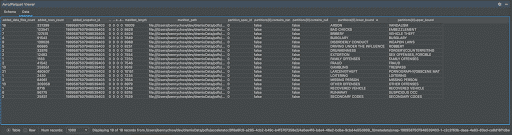
Here is the Iceberg manifest list associated with this reflection located at the below location:
As seen in the image above, this manifest list contains 18 manifest files. Each of these records in the list points to a manifest file and includes the lower and upper bound partition values for the parquet files within that manifest file. When SQL queries hit this table, if there are non-expression based filters on the partition columns, then the first stage of pruning can happen directly on this manifest list to reduce the number of manifest files that need to be read.Here is the Iceberg manifest file content for the manifest file with partition lower bound: LARCENY/THEFT.
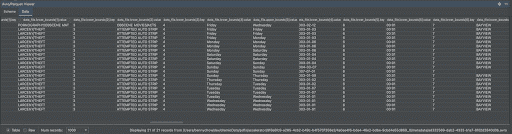
As you can see, this manifest file contains 21 splits (parquet files) with Categories between LARCENY/THEFTand PORNOGRAPHY/OBSCENE MATERIAL. For each Parquet file, the manifest file contains the lower and upper bound values for every field. This information is leveraged to do the second level of pruning when there are non-partition field filters on the table.
Notice in the snippet above, how each Parquet file contains mostly unique DayOfWeek values. This is because we specified a sort on the DayOfWeek column in the reflection definition. This becomes important when filtering on DayOfWeek because now we can do a second stage of Parquet file pruning.
Example 1:
Let’s take a look at the split pruning for this example query whose WHERE clause ideally matches the reflection definition:
SELECT PdDistrict, count(1) FROM incidents_iceberg where Category = 'LARCENY/THEFT' and (DayOfWeek = 'Monday' or DayOfWeek = 'Sunday') group by 1
In operator 02-03: IcebergManifestList, we scan 18 records in the Iceberg manifest file. We can see that the plan contains the following filter:
ManifestList Filter Expression =[(not_null(ref(name="Category")) and ref(name="Category") == "LARCENY/THEFT")]
Since the Categoryfield is both partitioned and filtered in our reflections definition, we can prune 18 manifest files down to 7. This can be manually verified by confirming that the value "LARCENY/THEFT" falls between the lower and upper bound of 7 manifest files.
Furthermore, the operator metric ICEBERG_SUB_SCAN under 02-xx-03, helps validate this result.
If we now look at operator 02-02, we can see that we scan the records in each of the 7 manifest files. Here’s the filter:
ManifestFile Filter AnyColExpression=[((not_null(ref(name="Category")) and not_null(ref(name="DayOfWeek"))) and (ref(name="Category") == "LARCENY/THEFT" and (ref(name="DayOfWeek") == "Monday" or ref(name="DayOfWeek") == "Sunday")))]
This prunes the Parquet files across the 7 manifest files down to 8 splits.
In this example, because we sorted the reflection by DayOfWeek, the Parquet files in each partition were sorted by DayOfWeek. As a result, a filter on DayOfWeek is likely to successfully prune splits. But today, planning does not look at the manifest file content so planning doesn’t know that applying the DayOfWeek filter would result in 8 splits. Here the planner estimated the split count as 20 as seen in operator 02-02’s estimate.
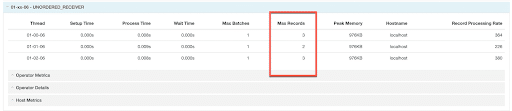
We can also confirm that 8 splits were distributed across three threads in phase 01 as seen in the snippet below:
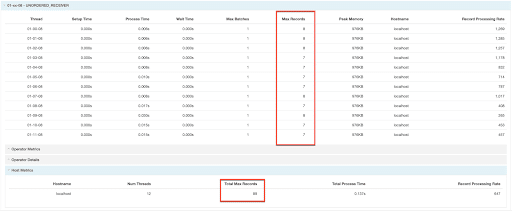
For a comparison, here is the same query run on a reflection with no partition or sorts (89 total splits) as seen in the snippets below. Even though the filters could be applied by the Iceberg API at the manifest file level, we still have to read all 89 splits because each Parquet file could contain data matching the filter conditions.
Here is another query that filters on the partitioned column but the predicate is based on an expression that we cannot evaluate directly on the manifest list file using the Iceberg APIs:
SELECT PdDistrict, count(1) FROM incidents_iceberg where Category like '%THEFT%' group by 1
As a result, the filtering happens in Dremio after reading all of the splits
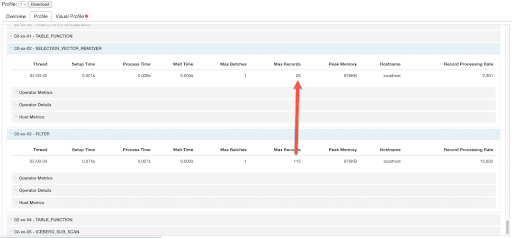
Notice how we have IcebergeManifestList → TableFunction → Filter → SelectionVectorRemover. Unlike the first example, operator 02-05 and 02-04 no longer include any ManifestList or ManifestFile filters. Instead, we process all the 115 splits with the split’s Category value and apply the LIKE filter in the operators 02-03 and 02-02 to prune splits down to 26 (and thus scan only 26 Parquet files).
Partition Stats and Best Cost Plan
All the above examples looked at physical plans where the planner had already determined the best cost logical plan using specific reflections or not. In order for logical planning to know which reflections to use, the planner needs row count estimates so that the planner can pick the lowest cost scan among equivalent scans. (It’s a little more advanced than this since the planner can add relational operators to make query sub-trees equivalent)
Using the same incidents dataset above, let’s take a look at how the planner picks the best cost plan between the three scenarios:
Scan on Incidents Table (i.e. incidents_parquet) - Partitioned by Category
Scan on Raw Reflection 1 - Partition by DayOfWeek
Scan on Raw Reflection 2 - No Partitions
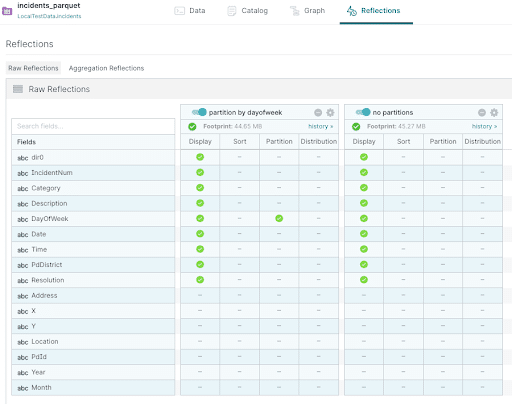
Here’s how the reflections are defined in Dremio.
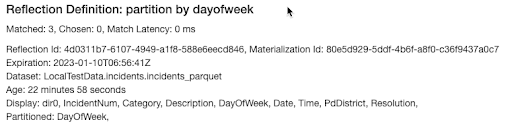
When running a user query, the query Raw Profile’s ‘Acceleration’ tab will contain the same definition information as shown here:
So, given this SQL:
select IncidentNum, Category, DayOfWeek
from "incidents_parquet"
where dir0 = '0_BURGLARY' and DayOfWeek = 'Sunday'
Let’s walk through Logical Planning and understand why the planner still chose to scan the base table “incidents_parquet” instead of scanning either reflection.
During the Logical Planning phase, we first generate canonicalized user query alternative plans which is just an equivalent form of the original user query that makes it more likely that a bottom up algebraic search will match. This is shown below:
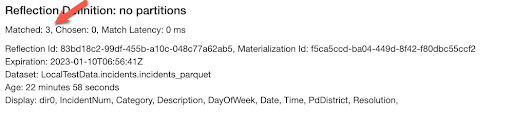
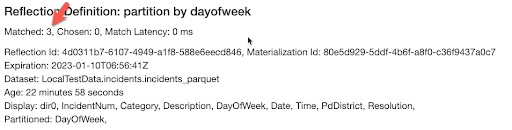
Then we go through the considered reflections and try to match into each of the alternative plans. In this case, each reflection matched and generated 3 alternative plans.
The result of searching across the matched plans for the lowest cost (i.e. best cost) plan is shown in the Logical Planning phase. This is the plan that is passed on to physical planning.
Among all possible equivalent plans, the above plan had the lowest cost. We can see the following:
Scanning the incidents_parquet was better than going to either reflection
The row count estimated was: 13731.449999999999
A partition filter was applied partition_range_filter:=($0, '0_BURGLARY') and the planner was able to get an exact row count from the avro stats file. This count was further reduced by non_partition_range_filter:=($3, 'Sunday');]
Best Cost Plan for Raw Reflection 1 - Partition by DayOfWeek
For each reflection, under the Acceleration tab, the query profile will pick out the best cost plan containing that reflection for reporting purposes. This may not be the plan that was selected during logical planning as is the case here. We can see the following:
4d0311b7-6107-4949-a1f8-588e6eecd846 is the reflection id
The row count estimated was: 17268.566310991286
A partition filter was applied partition_range_filter:=($3, 'Sunday') and the planner was able to get an exact row count from the avro stats file. The count was further reduced by non_partition_range_filter:=($0, '0_BURGLARY');]. However, 17,2678 > 13,731 so this plan was not selected.
Best Cost Plan for Raw Reflection 2 - No Partitions
This reflection was not selected. We can see the following:
83bd18c2-99df-455b-a10c-048c77a62ab5 is the reflection id
Row count estimate was very high, 116857.41616199167. The total number of records was about 2M.
The row count estimate was derived from non_partition_range_filter:AND(=($0, '0_BURGLARY'), =($3, 'Sunday'));]. Since neither column was partitioned, this reflection had no stats on those columns and used a simple heuristic based on the filters and total row count to estimate the row count after filtering.
It is possible to improve on simple heuristics when stats have been explicitly collected for the table. Read more here.
In summary, a reflection containing a large number of records should be designed to maximize partition and split pruning based on user query patterns. The examples demonstrated in this blog show how to verify that your queries are only reading the necessary data and provide insight into how the cost based planner picks among alternative user query plans. Finally, while the above discussion centered around Dremio Reflections, the same concepts apply to any Apache Iceberg table read by Dremio’s Sonar query engine.
If you are interested to explore reflections and try out Dremio's lakehouse platform, you can test drive it here.
For a deeper treatment of the topics in this post, download Apache Iceberg: The Definitive Guide by Tomer Shiran, Jason Hughes, and Alex Merced, free from Dremio.
Ingesting Data Into Apache Iceberg Tables with Dremio: A Unified Path to Iceberg
By unifying data from diverse sources, simplifying data operations, and providing powerful tools for data management, Dremio stands out as a comprehensive solution for modern data needs. Whether you are a data engineer, business analyst, or data scientist, harnessing the combined power of Dremio and Apache Iceberg will undoubtedly be a valuable asset in your data management toolkit.
Oct 12, 2023·Product Insights from the Dremio Blog
Table-Driven Access Policies Using Subqueries
This blog helps you learn about table-driven access policies in Dremio Cloud and Dremio Software v24.1+.
Aug 31, 2023·Dremio Blog: News Highlights
Dremio Arctic is Now Your Data Lakehouse Catalog in Dremio Cloud
Dremio Arctic bring new features to Dremio Cloud, including Apache Iceberg table optimization and Data as Code.